

Zendesk
Connect to Zendesk. Manage customer support tickets, users, organizations, and help desk operations

Supports authentication: API KEY
Set up the agent connector
Section titled “Set up the agent connector”Register your Zendesk API credentials with Scalekit so it can authenticate requests on your behalf. You’ll need your Zendesk subdomain, email address, and an API token from your Zendesk Admin Center.
-
Generate an API token
-
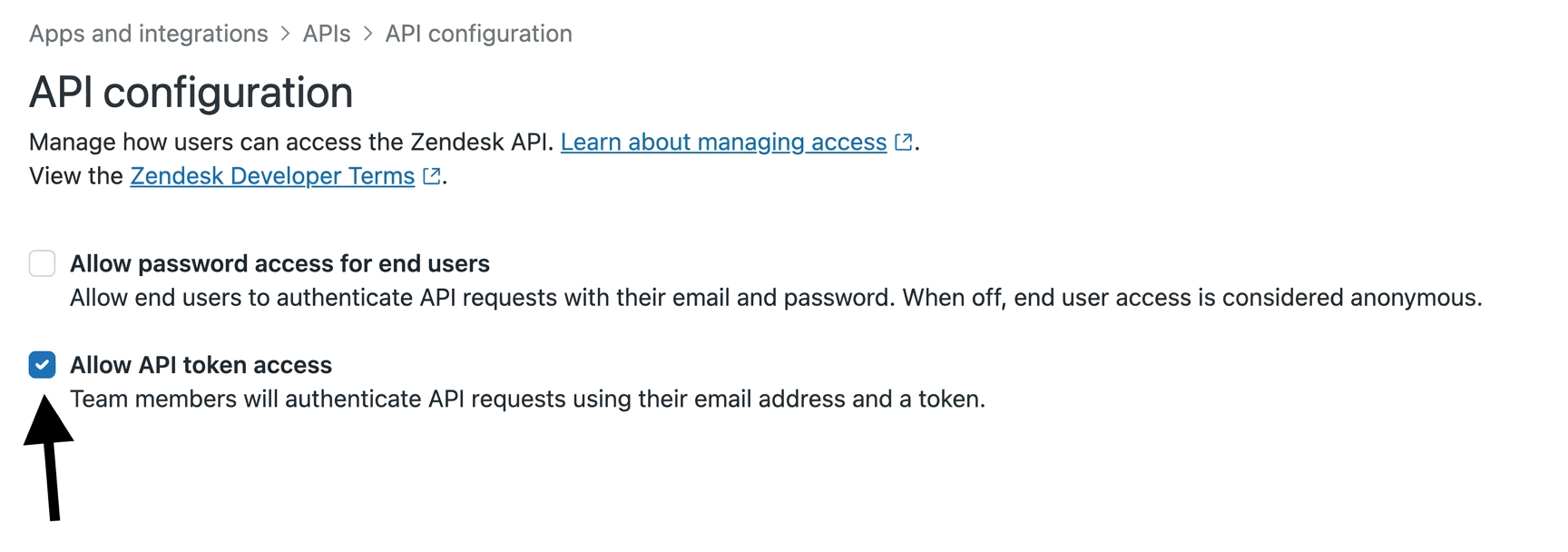
In your Zendesk Admin Center, go to Apps and integrations → APIs → Zendesk API.
-
Under Settings, enable Token access.
-
Click Add API token, enter a description, and click Create.
-
Copy the token — it is only shown once.
-
-
Create a connection
In Scalekit dashboard, go to Agent Auth → Create Connection. Find Zendesk and click Create.
-
Create a connected account
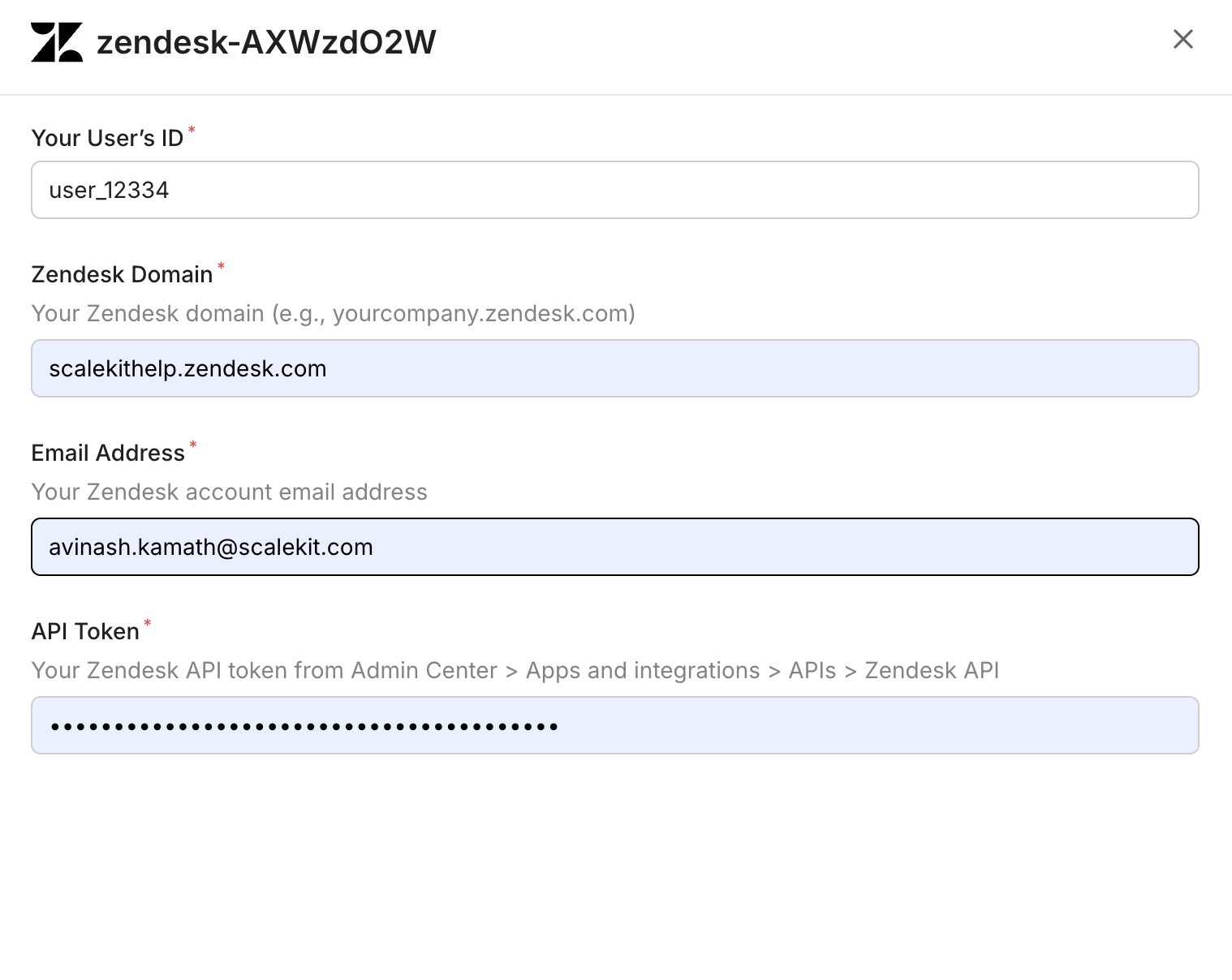
Go to Connected Accounts for your Zendesk connection and click Add account. Fill in the required fields:
-
Your User’s ID — a unique identifier for the user in your system
-
Zendesk Domain — your full Zendesk domain (e.g.,
yourcompany.zendesk.com) -
Email Address — the Zendesk account email address
-
API Token — the token you copied in step 1
-
Click Save.
-
Connect a user’s Zendesk account and make API calls on their behalf — Scalekit handles OAuth and token management automatically.
Don’t worry about your Zendesk domain in the path. Scalekit automatically resolves {{domain}} from the connected account’s configuration. For example, a request with path="/v2/users/me" will be sent to https://mycompany.zendesk.com/api/v2/users/me automatically.
Proxy API Calls
import { ScalekitClient } from '@scalekit-sdk/node';import 'dotenv/config';
const connectionName = 'zendesk'; // get your connection name from connection configurationsconst identifier = 'user_123'; // your unique user identifier
// Get your credentials from app.scalekit.com → Developers → Settings → API Credentialsconst scalekit = new ScalekitClient( process.env.SCALEKIT_ENV_URL, process.env.SCALEKIT_CLIENT_ID, process.env.SCALEKIT_CLIENT_SECRET);const actions = scalekit.actions;
// Authenticate the userconst { link } = await actions.getAuthorizationLink({ connectionName, identifier,});console.log('🔗 Authorize Zendesk:', link); // present this link to your user for authorization, or click it yourself for testingprocess.stdout.write('Press Enter after authorizing...');await new Promise(r => process.stdin.once('data', r));
// Make a request via Scalekit proxyconst result = await actions.request({ connectionName, identifier, path: '/v2/users/me', method: 'GET',});console.log(result);import scalekit.client, osfrom dotenv import load_dotenvload_dotenv()
connection_name = "zendesk" # get your connection name from connection configurationsidentifier = "user_123" # your unique user identifier
# Get your credentials from app.scalekit.com → Developers → Settings → API Credentialsscalekit_client = scalekit.client.ScalekitClient( client_id=os.getenv("SCALEKIT_CLIENT_ID"), client_secret=os.getenv("SCALEKIT_CLIENT_SECRET"), env_url=os.getenv("SCALEKIT_ENV_URL"),)actions = scalekit_client.actions
# Authenticate the userlink_response = actions.get_authorization_link( connection_name=connection_name, identifier=identifier)# present this link to your user for authorization, or click it yourself for testingprint("🔗 Authorize Zendesk:", link_response.link)input("Press Enter after authorizing...")
# Make a request via Scalekit proxyresult = actions.request( connection_name=connection_name, identifier=identifier, path="/v2/users/me", method="GET")print(result)Tool list
Section titled “Tool list”zendesk_groups_list
Section titled “zendesk_groups_list”List all groups in Zendesk. Groups are used to organize agents and route tickets.
| Name | Type | Required | Description |
|---|---|---|---|
page | number | No | Page number for pagination |
per_page | number | No | Number of groups per page (max 100) |
zendesk_organization_get
Section titled “zendesk_organization_get”Retrieve details of a specific Zendesk organization by ID. Returns organization name, domain names, tags, notes, shared ticket settings, and custom fields.
| Name | Type | Required | Description |
|---|---|---|---|
include | string | No | Additional related data to include (e.g., lookup_relationship_fields) |
organization_id | number | Yes | The ID of the organization to retrieve |
zendesk_organizations_list
Section titled “zendesk_organizations_list”List all organizations in Zendesk with pagination support.
| Name | Type | Required | Description |
|---|---|---|---|
page | number | No | Page number for pagination |
per_page | number | No | Number of organizations per page (max 100) |
zendesk_search_tickets
Section titled “zendesk_search_tickets”Search Zendesk tickets using a query string. Supports Zendesk’s search syntax (e.g., ‘type:ticket status:open’). Zendesk limits search results to 1,000 total — the maximum valid page is floor(1000 / per_page) (e.g., per_page=100 → max page 10, per_page=25 → max page 40). Stop paginating when next_page is null or you reach the max page; requesting beyond the limit returns a 400 error.
| Name | Type | Required | Description |
|---|---|---|---|
page | number | No | Page number for pagination. Max valid page = floor(1000 / per_page). Do not exceed this — Zendesk returns a 400 error beyond the 1,000 result limit. |
per_page | number | No | Number of results per page (max 100). Determines the max page ceiling: floor(1000 / per_page). Higher values mean fewer pages but a lower max page number. |
query | string | Yes | Search query string using Zendesk search syntax (e.g., ‘type:ticket status:open assignee:me’) |
sort_by | string | No | Field to sort results by (updated_at, created_at, priority, status, ticket_type) |
sort_order | string | No | Sort direction: asc or desc (default: desc) |
zendesk_side_conversation_get
Section titled “zendesk_side_conversation_get”Retrieve a specific side conversation on a Zendesk ticket by its ID. Returns the side conversation’s state, subject, participants, preview text, and timestamps. Requires the Collaboration add-on.
| Name | Type | Required | Description |
|---|---|---|---|
include | string | No | Sideloads to include alongside the response. Use ‘side_conversation_events’ to include the full event history of the side conversation. |
side_conversation_id | string | Yes | The ID of the side conversation to retrieve |
ticket_id | number | Yes | The ID of the parent ticket |
zendesk_side_conversations_list
Section titled “zendesk_side_conversations_list”List all side conversations on a Zendesk ticket. Returns side conversations including their state, subject, participants, and preview text. Requires the Collaboration add-on.
| Name | Type | Required | Description |
|---|---|---|---|
include | string | No | Sideloads to include alongside the response. Use ‘side_conversation_events’ to include the full event history for each side conversation. |
ticket_id | number | Yes | The ID of the ticket whose side conversations to list |
zendesk_ticket_comments_list
Section titled “zendesk_ticket_comments_list”Retrieve all comments (public replies and internal notes) for a specific Zendesk ticket. Returns comment body, author, timestamps, and attachments.
| Name | Type | Required | Description |
|---|---|---|---|
include | string | No | Sideloads to include. Accepts ‘users’ to list email CCs. |
include_inline_images | boolean | No | When true, inline images are listed as attachments (default: false) |
sort_order | string | No | Sort direction for comments: asc or desc (default: asc) |
ticket_id | number | Yes | The ID of the ticket whose comments to list |
zendesk_ticket_create
Section titled “zendesk_ticket_create”Create a new support ticket in Zendesk. Requires a comment/description and optionally a subject, priority, assignee, and tags.
| Name | Type | Required | Description |
|---|---|---|---|
assignee_email | string | No | Email of the agent to assign the ticket to |
comment_body | string | Yes | The description or first comment of the ticket |
priority | string | No | Ticket priority: urgent, high, normal, or low |
status | string | No | Ticket status: new, open, pending, hold, solved, or closed |
subject | string | No | The subject/title of the ticket |
tags | array<string> | No | List of tags to apply to the ticket |
type | string | No | Ticket type: problem, incident, question, or task |
zendesk_ticket_get
Section titled “zendesk_ticket_get”Retrieve details of a specific Zendesk ticket by ID. Returns ticket properties including status, priority, subject, requester, assignee, and timestamps.
| Name | Type | Required | Description |
|---|---|---|---|
include | string | No | Comma-separated list of sideloads to include (e.g., users, groups, organizations) |
ticket_id | number | Yes | The ID of the ticket to retrieve |
zendesk_ticket_reply
Section titled “zendesk_ticket_reply”Add a public reply or internal note to a Zendesk ticket. Set public to false for internal notes visible only to agents.
| Name | Type | Required | Description |
|---|---|---|---|
body | string | Yes | The reply message content (plain text, markdown supported) |
public | boolean | No | Whether the comment is public (true) or an internal note (false). Defaults to true. |
ticket_id | number | Yes | The ID of the ticket to reply to |
zendesk_ticket_update
Section titled “zendesk_ticket_update”Update an existing Zendesk ticket. Change status, priority, assignee, subject, tags, or any other writable ticket field.
| Name | Type | Required | Description |
|---|---|---|---|
assignee_email | string | No | Email of the agent to assign the ticket to |
assignee_id | number | No | ID of the agent to assign the ticket to |
group_id | number | No | ID of the group to assign the ticket to |
priority | string | No | Ticket priority: urgent, high, normal, or low |
status | string | No | Ticket status: new, open, pending, hold, solved, or closed |
subject | string | No | New subject/title for the ticket |
tags | array<string> | No | List of tags to set on the ticket (replaces existing tags) |
ticket_id | number | Yes | The ID of the ticket to update |
type | string | No | Ticket type: problem, incident, question, or task |
zendesk_tickets_list
Section titled “zendesk_tickets_list”List tickets in Zendesk with sorting and pagination. Returns tickets for the authenticated agent’s account.
| Name | Type | Required | Description |
|---|---|---|---|
page | number | No | Page number for pagination |
per_page | number | No | Number of tickets per page (max 100) |
sort_by | string | No | Field to sort by: created_at, updated_at, priority, status, ticket_type |
sort_order | string | No | Sort direction: asc or desc (default: desc) |
zendesk_user_create
Section titled “zendesk_user_create”Create a new user in Zendesk. Can create end-users (customers), agents, or admins. Email is required for end-users.
| Name | Type | Required | Description |
|---|---|---|---|
email | string | No | Primary email address of the user |
name | string | Yes | Full name of the user |
organization_id | number | No | ID of the organization to associate the user with |
phone | string | No | Primary phone number (E.164 format, e.g. +15551234567) |
role | string | No | User role: end-user, agent, or admin. Defaults to end-user. |
verified | boolean | No | Whether the user’s identity is verified. Defaults to false. |
zendesk_user_get
Section titled “zendesk_user_get”Retrieve details of a specific Zendesk user by ID. Returns user profile including name, email, role, organization, and account status.
| Name | Type | Required | Description |
|---|---|---|---|
include | string | No | Comma-separated list of sideloads to include |
user_id | number | Yes | The ID of the user to retrieve |
zendesk_users_list
Section titled “zendesk_users_list”List users in Zendesk. Filter by role (end-user, agent, admin) with pagination support.
| Name | Type | Required | Description |
|---|---|---|---|
page | number | No | Page number for pagination |
per_page | number | No | Number of users per page (max 100) |
role | string | No | Filter by role: end-user, agent, or admin |
sort | string | No | Field to sort by. Prefix with - for descending (e.g. -created_at) |
zendesk_views_list
Section titled “zendesk_views_list”List ticket views in Zendesk. Views are saved filters for organizing tickets by status, assignee, tags, and more.
| Name | Type | Required | Description |
|---|---|---|---|
access | string | No | Filter by access level: personal, shared, or account |
page | number | No | Page number for pagination |
per_page | number | No | Number of views per page (max 100) |
sort_by | string | No | Field to sort by: title, updated_at, created_at, or position |
sort_order | string | No | Sort direction: asc or desc |